
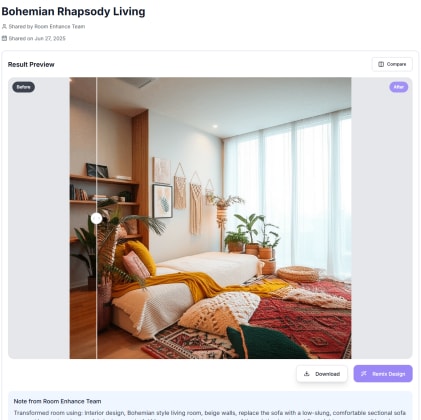
AI Share & Collaborate: The Complete Guide to Seamless Design Teamwork
The complexity of modern design projects has evolved far beyond what any single person can manage effectively. Today's interior design, renovation, and property development projects require seamless coordination between homeowners, family members, designers, contractors, vendors, and stakeholders—each bringing unique perspectives, requirements, and approval authority to the creative process.
AI Share & Collaborate represents a revolutionary approach to design teamwork that leverages artificial intelligence to streamline communication, optimize decision-making processes, and ensure all stakeholders remain aligned throughout project development. This comprehensive guide explores how intelligent collaboration transforms design from a challenging coordination exercise into a smooth, enjoyable creative journey.
The Evolution of Design Collaboration
Traditional Design Communication Challenges
Communication Fragmentation:
- Multiple communication channels (email, phone, text, in-person meetings)
- Version control confusion with outdated design documents and images
- Missed communications and delayed responses causing project delays
- Difficulty tracking decisions and approval history
- Language barriers between technical professionals and clients
Decision-Making Complexity:
- Unclear approval hierarchies and decision authority
- Lengthy approval cycles that slow project momentum
- Difficulty visualizing and comparing design options
- Lack of centralized feedback collection and organization
- Emotional decision-making without data-driven insights
Stakeholder Coordination:
- Scheduling challenges for multi-party meetings and reviews
- Geographic distribution making in-person collaboration difficult
- Time zone differences complicating international projects
- Professional workflow integration across different software platforms
- Budget and timeline coordination across multiple team members
AI-Powered Collaboration Advantages
Intelligent Communication:
- Centralized platform that consolidates all project communication
- Automated translation and communication style adaptation
- Smart notification systems that prioritize urgent decisions
- Context-aware suggestions for improved clarity and understanding
- Real-time collaboration with instant feedback and iteration
Enhanced Decision-Making:
- Visual comparison tools for evaluating design alternatives
- Data-driven insights supporting design choices
- Automated approval workflows with clear accountability
- Historical decision tracking and rationale documentation
- Predictive analysis of decision impact on timeline and budget
Seamless Coordination:
- Automated scheduling based on stakeholder availability and project needs
- Integrated timeline management with milestone tracking
- Real-time budget and cost impact sharing across team members
- Professional tool integration for streamlined workflow
- Mobile accessibility for on-site collaboration and approval
Core Features and Collaboration Capabilities
Intelligent Sharing Platforms
AI Share & Collaborate provides sophisticated sharing capabilities that go far beyond simple file sharing:
Dynamic Content Sharing:
- Interactive design visualizations that stakeholders can explore and modify
- Real-time design iteration with instant updates across all team members
- Contextual sharing that provides relevant information based on recipient role
- Automated sharing workflows triggered by project milestones
- Version control with complete change history and rollback capabilities
Personalized Access Control:
- Role-based permissions ensuring appropriate access levels for different stakeholders
- Client-friendly interfaces that simplify technical information
- Professional-grade tools for contractors and design professionals
- Family collaboration features for household decision-making
- Investor and financial stakeholder reporting dashboards
Cross-Platform Integration:
- Seamless integration with popular design software and project management tools
- Social media sharing for client marketing and portfolio development
- Email and calendar integration for automated scheduling and reminders
- Mobile app synchronization for on-site access and real-time updates
- Cloud storage integration for comprehensive document management
Advanced Decision-Making Tools
Visual Comparison Systems:
- Side-by-side design option comparison with detailed analysis
- Interactive voting and preference ranking for group decisions
- Cost impact overlay showing financial implications of different choices
- Timeline impact analysis for decisions affecting project schedule
- Stakeholder feedback collection with sentiment analysis and priority scoring
Consensus Building Features:
- Intelligent compromise suggestion based on stakeholder preferences
- Priority weighting systems that balance different stakeholder needs
- Conflict resolution guidance for disagreements and deadlocks
- Alternative solution generation when initial options don't satisfy all parties
- Decision rationale documentation for future reference and learning
Approval Workflow Automation:
- Customizable approval chains based on project hierarchy and budget levels
- Automated escalation for delayed approvals that impact project timeline
- Electronic signature integration for legally binding approvals
- Change order approval workflows with cost and timeline impact analysis
- Milestone approval gates that ensure quality control and stakeholder satisfaction
Real-Time Collaboration Environment
Live Design Sessions:
- Real-time design modification with multiple participants
- Voice and video integration for rich communication during design reviews
- Screen sharing and annotation tools for detailed feedback
- Recording capabilities for future reference and stakeholder education
- Interactive whiteboarding for brainstorming and concept development
Asynchronous Collaboration:
- Time-stamped feedback collection for different time zones and schedules
- Threaded discussions organized by design element or project phase
- Priority flagging system for urgent feedback and decisions
- Automated summary generation of feedback and decisions
- Notification management that respects individual communication preferences
Stakeholder-Specific Collaboration Features
Homeowner and Client Collaboration
Family Decision-Making:
- Individual preference tracking and family consensus building
- Children and teenager input collection for age-appropriate involvement
- Budget impact transparency for financial decision-making
- Lifestyle consideration integration for long-term satisfaction
- Priority ranking systems that balance different family member needs
Client-Designer Communication:
- Professional presentation tools that communicate design rationale effectively
- Budget impact visualization for informed financial decisions
- Timeline coordination that respects client schedules and preferences
- Change request management with cost and timeline impact analysis
- Progress tracking with milestone completion and payment coordination
Educational Resources:
- Interactive design education that helps clients understand options and implications
- Style guide development for consistent decision-making throughout project
- Maintenance and care instruction integration for long-term satisfaction
- Warranty and service information management
- Post-completion support and modification planning
Professional Team Coordination
Designer-Contractor Collaboration:
- Technical specification sharing with automatic formatting for different audiences
- Installation instruction development and distribution
- Quality control checkpoint coordination and documentation
- Problem-solving collaboration for unexpected conditions
- Performance tracking and improvement identification
Multi-Disciplinary Professional Teams:
- Architect, interior designer, and contractor coordination platforms
- Specialist integration for lighting, acoustics, and technology professionals
- Vendor coordination for custom work and specialty installations
- Permit and inspection coordination with regulatory compliance tracking
- Professional development and knowledge sharing across team members
Client Service Enhancement:
- Professional presentation tools that enhance client relationships
- Portfolio development and marketing material creation
- Referral and testimonial collection systems
- Business development and relationship management integration
- Quality assurance and client satisfaction tracking
Vendor and Supplier Integration
Product Selection Collaboration:
- Real-time inventory and availability sharing from suppliers
- Custom product development coordination for unique requirements
- Delivery scheduling coordination with project timeline
- Quality control and inspection coordination
- Warranty and service support integration
Purchasing and Procurement:
- Group purchasing coordination for volume discounts
- Payment coordination and financial management
- Quality verification and acceptance procedures
- Returns and exchange management
- Vendor performance tracking and relationship management
Advanced Collaboration Technologies
Artificial Intelligence Enhancement
Intelligent Content Curation:
- Automatic organization of project content by relevance and priority
- Smart tagging and categorization for easy retrieval
- Duplicate content identification and consolidation
- Outdated information identification and update recommendations
- Relevant content suggestion based on project phase and stakeholder needs
Predictive Collaboration:
- Stakeholder availability prediction for optimal meeting scheduling
- Decision timeline prediction based on project complexity and stakeholder patterns
- Conflict prediction and early intervention recommendations
- Resource allocation optimization for maximum team efficiency
- Quality outcome prediction based on collaboration patterns
Communication Optimization:
- Language and tone adaptation for different stakeholder communication styles
- Cultural sensitivity integration for international projects
- Technical translation for non-professional stakeholders
- Emotional intelligence integration for conflict prevention and resolution
- Efficiency optimization for meeting and communication planning
Immersive Collaboration Experiences
Virtual and Augmented Reality:
- Shared virtual reality design reviews for immersive collaboration
- Augmented reality on-site collaboration for real-world design evaluation
- Mixed reality experiences that combine digital design with physical spaces
- Remote virtual walkthroughs for distributed team collaboration
- Interactive 3D model manipulation for detailed design discussion
Interactive Design Environments:
- Real-time design modification with instant visual feedback
- Collaborative sketching and annotation tools
- Interactive material and color selection with group input
- Lighting simulation and adjustment for different scenarios
- Acoustic and environmental factor simulation for comprehensive evaluation
Integration and Workflow Optimization
Business System Integration:
- Customer relationship management (CRM) integration for comprehensive client management
- Project management software integration for timeline and resource coordination
- Accounting and financial software integration for budget and payment management
- Document management system integration for comprehensive record keeping
- Quality management system integration for performance tracking and improvement
Professional Tool Connectivity:
- CAD and 3D modeling software integration for technical professionals
- Rendering and visualization software connectivity
- Specification and documentation software integration
- Procurement and vendor management system connectivity
- Building information modeling (BIM) integration for complex projects
Implementation Strategies and Best Practices
Project Setup and Organization
Stakeholder Identification and Role Definition:
- Clear role definition with appropriate access levels and responsibilities
- Decision authority hierarchy establishment for efficient approval processes
- Communication preference documentation for personalized interaction
- Availability and schedule coordination for optimal collaboration timing
- Conflict resolution process establishment for smooth problem-solving
Collaboration Framework Development:
- Communication protocol establishment for different project phases
- Meeting cadence and format optimization for stakeholder needs
- Decision-making process definition with clear timelines and responsibilities
- Change management procedures for scope and timeline modifications
- Quality control checkpoint establishment for consistent standards
Technology Platform Configuration:
- User access setup with appropriate permissions and training
- Notification preference configuration for individual communication styles
- Integration setup with existing business and personal systems
- Mobile access configuration for on-site and travel collaboration
- Security and privacy setting establishment for sensitive information protection
Communication Excellence
Clear Communication Standards:
- Professional communication guidelines that respect all stakeholder levels
- Technical translation protocols for non-professional participants
- Visual communication enhancement through intelligent graphics and annotation
- Cultural sensitivity integration for diverse stakeholder groups
- Conflict prevention through proactive communication and expectation management
Efficient Information Management:
- Centralized information organization with intelligent categorization
- Version control protocols that prevent confusion and miscommunication
- Archive and retrieval systems for historical reference and learning
- Backup and redundancy systems for information security
- Access audit trails for accountability and security management
Performance Optimization
Collaboration Metrics and Analysis:
- Decision timeline tracking and optimization opportunities
- Communication efficiency measurement and improvement identification
- Stakeholder satisfaction monitoring and enhancement strategies
- Project outcome correlation with collaboration effectiveness
- Continuous improvement implementation based on performance data
Team Development and Training:
- Collaboration skill development for improved team effectiveness
- Technology training for optimal platform utilization
- Cultural competency development for diverse team success
- Conflict resolution skill enhancement for smooth project execution
- Leadership development for effective project coordination
Industry Applications and Use Cases
Residential Design Projects
Single-Family Home Renovation:
- Family decision coordination for major home improvements
- Designer-homeowner collaboration for personalized design development
- Contractor coordination for efficient project execution
- Vendor integration for custom work and specialty installations
- Neighbor and community consideration for exterior modifications
Multi-Generational Living Spaces:
- Extended family input collection and consensus building
- Accessibility requirement integration across different age groups
- Privacy and shared space balance optimization
- Cultural consideration integration for diverse family backgrounds
- Long-term adaptability planning for changing family needs
Commercial and Hospitality Projects
Office Design and Workplace Optimization:
- Employee input collection for workspace design decisions
- Management approval coordination for budget and timeline decisions
- IT and facilities team integration for infrastructure requirements
- Vendor coordination for furniture and technology installation
- Change management support for workplace transition
Restaurant and Retail Design:
- Owner-designer-contractor collaboration for complex commercial projects
- Regulatory compliance coordination with local authorities
- Vendor integration for specialized equipment and installations
- Marketing team collaboration for brand consistency and customer appeal
- Operations team input for functional efficiency and workflow optimization
Real Estate Development
Multi-Unit Residential Development:
- Developer-architect-contractor collaboration for efficient project delivery
- Marketing team integration for market appeal and competitive positioning
- Investor communication and approval coordination
- Regulatory compliance and permit coordination
- Community stakeholder engagement and feedback integration
Commercial Property Development:
- Multiple professional team coordination for complex projects
- Tenant input collection for custom buildout requirements
- Financial stakeholder reporting and approval coordination
- Property management team integration for operational efficiency
- Market research and competitive analysis collaboration
Frequently Asked Questions (FAQs)
Getting Started with AI Share & Collaborate
Q: How does AI Share & Collaborate differ from regular file sharing and communication tools? A: AI Share & Collaborate goes far beyond basic file sharing by providing intelligent collaboration features like automated workflow management, smart decision-making tools, real-time design iteration, and stakeholder-specific interfaces. The AI optimizes communication, predicts collaboration needs, and streamlines decision-making processes rather than just storing and sharing files.
Q: What types of design projects benefit most from collaborative AI tools? A: Any project involving multiple stakeholders benefits significantly, but AI collaboration is particularly valuable for family home renovations, commercial design projects, real estate development, and any project with budget approval hierarchies. The more complex the stakeholder structure, the greater the benefit from intelligent collaboration management.
Q: How do I set up a collaborative project and invite team members? A: Setting up a project involves defining stakeholder roles, establishing decision hierarchies, configuring notification preferences, and setting access permissions. The system guides you through stakeholder invitation with customized onboarding based on their role (client, professional, vendor, etc.). Each stakeholder receives an interface appropriate to their involvement level.
Q: Can family members with different technical skill levels all participate effectively? A: Absolutely! The system provides role-appropriate interfaces, with simplified, visual tools for non-technical family members and advanced features for professionals. AI assistance helps translate technical concepts into understandable language, and the platform adapts to individual communication styles and preferences.
Collaboration Features Questions
Q: How does the system handle disagreements and conflicting opinions between stakeholders? A: AI Share & Collaborate includes intelligent conflict resolution tools that identify compromise solutions, suggest alternatives that satisfy multiple parties, and provide data-driven insights to inform discussions. The system can facilitate structured decision-making processes and maintain detailed rationale documentation for future reference.
Q: Can I control what information different stakeholders can see and modify? A: Yes! The platform provides granular permission controls, allowing you to customize access levels for different stakeholders. Clients might see design options and costs, while contractors access technical specifications and timelines. Family members can participate in style decisions while financial stakeholders focus on budget and ROI information.
Q: How does real-time collaboration work, and what happens if people are in different time zones? A: Real-time collaboration allows simultaneous design review and modification, with voice/video integration and interactive annotation tools. For different time zones, the system provides asynchronous collaboration features including time-stamped feedback, threaded discussions, and automated notification scheduling that respects individual time preferences.
Q: Can we make design decisions together even when we can't meet in person? A: Yes! The platform excels at remote collaboration with virtual design review sessions, shared screen capabilities, interactive voting and ranking tools, and immersive VR/AR experiences. Stakeholders can collaborate effectively regardless of geographic location, with tools that often provide better collaboration than traditional in-person meetings.
Professional Integration Questions
Q: How does AI Share & Collaborate integrate with existing design software and project management tools? A: The platform provides comprehensive integration with popular CAD software, 3D modeling tools, project management platforms, and business systems. This ensures professionals can maintain their existing workflows while gaining enhanced collaboration capabilities. API access allows custom integrations for specialized business needs.
Q: Can contractors and vendors participate in the collaboration platform? A: Absolutely! The system provides specialized interfaces for contractors and vendors that focus on technical specifications, timelines, and coordination needs. Contractors can access installation instructions, provide progress updates, and coordinate with other trades, while vendors can share product information and delivery schedules.
Q: How does the system support professional presentation and client communication? A: Professional features include presentation mode for client meetings, automated report generation, portfolio development tools, and client education resources. The system helps professionals communicate design rationale effectively while maintaining their expertise and authority in the collaboration process.
Q: Can I use this platform to manage multiple projects simultaneously? A: Yes! Professional accounts include portfolio management features for handling multiple projects, tracking performance across different clients, optimizing resource allocation, and maintaining consistent quality standards. The system provides dashboard views and automated reporting for business management.
Decision-Making and Approval Questions
Q: How does the approval workflow work for decisions that affect budget or timeline? A: The system provides customizable approval chains based on decision impact and organizational hierarchy. Budget-affecting decisions automatically route to appropriate financial stakeholders, while timeline changes notify all affected parties. Electronic signature integration ensures legally binding approvals, and escalation procedures prevent delays.
Q: Can we track the history of decisions and understand why choices were made? A: Yes! Complete decision tracking includes rationale documentation, alternative options considered, cost impacts, stakeholder input, and final approval details. This historical record helps with future decisions, change orders, and project learning. The system also identifies decision patterns for improved future collaboration.
Q: How does the system help us prioritize decisions when there are many options to consider? A: AI analysis provides priority ranking based on cost impact, timeline implications, and stakeholder preferences. The system can suggest optimal decision sequences, identify dependencies between choices, and provide data-driven insights about which decisions provide maximum project benefit.
Q: What happens if we need to change decisions that have already been approved? A: Change management features provide impact analysis for proposed modifications, including cost and timeline implications. The system routes change requests through appropriate approval channels and helps evaluate alternatives that minimize disruption to the overall project.
Technical and Security Questions
Q: How secure is our project information and communication on the platform? A: The platform employs enterprise-grade security including encrypted data transmission and storage, access audit trails, secure authentication, and compliance with privacy regulations. You maintain full control over your data, and stakeholder access is strictly controlled according to your specifications.
Q: Can I export project data and collaboration history if needed? A: Yes! Comprehensive export capabilities include project documentation, decision history, communication records, and collaboration analytics. Data can be exported in various formats for integration with other systems, portfolio development, or long-term archival.
Q: What happens to our project data after the project is completed? A: You control data retention policies, with options for continued access, archival, or deletion according to your preferences. Many clients maintain access for warranty periods, future modifications, or portfolio development. Professional accounts often include expanded storage for business development purposes.
Q: How does the system handle technical support and user assistance? A: Comprehensive support includes online tutorials, contextual help, customer service chat, and professional consultation services. The AI provides intelligent assistance within the platform, and support teams can provide remote assistance for complex setup or troubleshooting needs.
Cost and Value Questions
Q: How much does AI Share & Collaborate cost, and what's included in different pricing tiers? A: Pricing varies based on project complexity and user count, with options from basic family collaboration to enterprise professional accounts. Basic plans include core collaboration features, while professional accounts add advanced workflow management, integration capabilities, and business development tools. Custom enterprise pricing is available for large organizations.
Q: What return on investment can I expect from using collaborative AI tools? A: Projects using AI collaboration typically complete 25% faster with 40% fewer miscommunications and decision delays. Professional users report improved client satisfaction, reduced project stress, and increased referral business. The time savings alone often justify the platform cost, with improved outcomes providing additional value.
Q: Can I try the platform before committing to a full project? A: Yes! Trial periods and demo projects allow you to experience the collaboration features before committing to a full implementation. Many users start with smaller projects to learn the system before applying it to major renovations or commercial projects.
Q: How does the cost compare to traditional coordination methods like meetings and email? A: When you factor in time savings, reduced miscommunications, fewer change orders, and improved project outcomes, collaborative AI typically provides significant cost savings. The efficiency gains and improved decision-making quality often result in overall project cost reductions that far exceed the platform subscription cost.
Future Developments and Technology Evolution
Artificial Intelligence Advancement
Enhanced Prediction Capabilities:
- Improved stakeholder behavior prediction for optimal collaboration timing
- Better conflict prediction and prevention through communication analysis
- Enhanced decision outcome prediction based on historical project data
- More sophisticated resource allocation optimization for team efficiency
Natural Language Processing:
- Advanced language translation for international project collaboration
- Improved technical language simplification for non-professional stakeholders
- Enhanced sentiment analysis for communication optimization
- Better context understanding for more relevant suggestions and automation
Immersive Technology Integration
Virtual and Augmented Reality:
- Shared virtual reality environments for immersive design collaboration
- Augmented reality on-site collaboration for real-world design evaluation
- Mixed reality experiences combining digital design with physical spaces
- Haptic feedback integration for more realistic collaborative experiences
Advanced Visualization:
- Real-time photorealistic rendering for instant design feedback
- Interactive lighting and environmental simulation for comprehensive evaluation
- Acoustic modeling and simulation for complete sensory design assessment
- Time-lapse project visualization for understanding long-term implications
Ecosystem Integration Expansion
Professional Service Integration:
- Enhanced integration with legal and financial services for comprehensive project support
- Insurance and warranty integration for risk management and protection
- Regulatory compliance automation and guidance integration
- Quality assurance and certification integration for professional standards
Market Intelligence Integration:
- Real-time market trend integration for informed design decisions
- Competitive analysis and positioning guidance for professional projects
- ROI optimization based on current market conditions and trends
- Sustainability and environmental impact integration for responsible design choices
Conclusion: The Future of Collaborative Design
AI Share & Collaborate represents a fundamental transformation in how design projects are conceived, developed, and executed. By leveraging artificial intelligence to optimize human collaboration, this technology eliminates the communication barriers, decision-making delays, and coordination challenges that have historically plagued complex design projects.
The impact extends far beyond efficiency improvements. When stakeholders can collaborate effectively, creativity flourishes, better decisions emerge, and project outcomes exceed expectations. Families find themselves more aligned on design choices, professionals deliver superior service, and projects complete faster with greater satisfaction for everyone involved.
As collaboration technology continues to evolve with enhanced AI capabilities, immersive experiences, and deeper integration with professional and business systems, the future of design becomes increasingly collaborative and inclusive. The technology doesn't replace human creativity and judgment—it amplifies and enhances our natural collaborative abilities.
Whether you're planning a family home renovation, managing a commercial design project, or coordinating a large-scale development, AI Share & Collaborate provides the intelligence, organization, and facilitation needed to transform coordination challenges into creative opportunities.
The era of miscommunication, decision delays, and stakeholder frustration in design projects is ending. AI Share & Collaborate ushers in a new age of seamless teamwork where technology serves human creativity and every voice contributes to exceptional design outcomes.
Ready to transform your design collaboration? Try AI Share & Collaborate today and discover how intelligent teamwork can turn your next project into a smooth, enjoyable creative journey for everyone involved.
Your weekly interior design & AI brief.
Room inspiration, design tips, and the AI tools transforming how spaces get styled. Free, every week.
Read this week's issueRelated Articles

AI-Powered Client Presentations | Professional Interior Design Visualization Tools – Save 15 Hours Per Project & Boost Client Satisfaction by 47% | Complete Designer Workflow Revolution
Revolutionize your interior design workflow with AI visualization tools. Learn how leading designers save 15+ hours per project while improving client satisfaction by 47% through enhanced presentations.
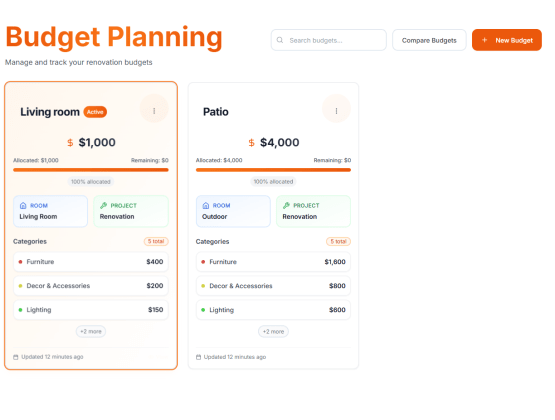
AI Budget Planning: Smart Financial Strategies for Home Renovation Success | Complete Guide to Intelligent Budget Optimization – Multi-Budget Management, Real-Time Cost Analysis & Professional Financial Planning Tools | Transform Your Renovation Finance with Predictive Analytics
Master intelligent budget planning with AI-powered financial optimization. Learn how smart budget allocation, predictive cost modeling, and strategic planning can maximize renovation impact while minimizing financial risk.

AI Color Matching Technology: Precision Tools Revolutionizing Interior Design Color Coordination | Perfect Color Harmony 2025
Discover how AI-powered color matching technology is transforming interior design through precise color coordination, perfect palette generation, and intelligent color harmony analysis.
Ready to Transform Your Space?
See how your room would look with a completely new design. Our AI can help you visualize different styles in minutes.